Meep: 2D Directional Coupler
Meep remains supported for capabilities not yet available in GDSFactory FDTD. This notebook is the maintained reference for a true 2D effective-index simulation.
Requirements: GDSFactory+ cloud simulation access.
Load a pcell from UBC PDK
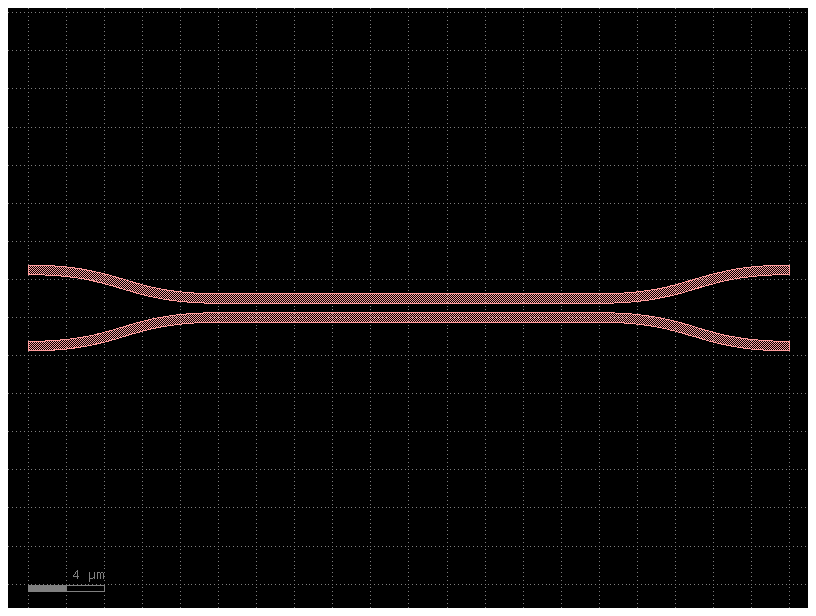
Configure 2D simulation
Two things differ from a 3D simulation:
sim.solver(mode="2d", z_cut="auto")collapses the z-dimension, ignores sidewall angles, and enforces TE polarization;- because z is collapsed, the materials must be supplied as effective indices of the vertical stack, not bulk indices. Nothing computes this for you, so the cell below solves the slab problem for the core thickness in the active PDK.
Using bulk silicon here is a large error rather than a small one: for a 220 nm SOI core it puts the mode index at about 3.15 instead of 2.44, and the coupling length of this very coupler comes out roughly six times too long.
import numpy as np
from scipy.optimize import brentq

from gsim import meep
from gsim.common.stack import get_stack
from gsim.meep.models.api import Material

stack = get_stack()  # auto-detects active PDK

N_SI, N_SIO2, WAVELENGTH = 3.47, 1.44, 1.55


def slab_neff(thickness, n_core, n_clad, wavelength):
    """Fundamental TE effective index of a symmetric slab.

    Exact root of u tan(u) = w with u^2 + w^2 = V^2, so the index below is
    derived from the stack rather than pasted in.
    """
    k0 = 2 * np.pi / wavelength
    a = thickness / 2
    V = k0 * a * np.sqrt(n_core**2 - n_clad**2)
    u = brentq(
        lambda u: u * np.tan(u) - np.sqrt(V**2 - u**2),
        1e-12,
        min(V, np.pi / 2) - 1e-12,
    )
    return float(np.sqrt(n_core**2 - (u / (k0 * a)) ** 2))


# Collapsing z means the 2D silicon region must carry the EFFECTIVE index of
# the vertical slab, not the bulk index of silicon. Outside the core the
# column is plain oxide, so that one keeps its bulk value.
n_si_2d = slab_neff(stack.layers["core"].thickness, N_SI, N_SIO2, WAVELENGTH)
print(
    f"core thickness {stack.layers['core'].thickness * 1e3:.0f} nm "
    f"-> 2D silicon index {n_si_2d:.5f} (bulk is {N_SI})"
)

sim = meep.Simulation()

sim.geometry(component=c, stack=stack)
sim.materials = {
    "si": Material(refractive_index=n_si_2d),
    "SiO2": Material(refractive_index=N_SIO2),
}
sim.source(port="o1", wavelength=WAVELENGTH, wavelength_span=0.01)
sim.monitors = ["o1", "o2", "o3"]
sim.domain(pml=1.0, margin_x=0.5, margin_y=0.5)
sim.solver(resolution=25, mode="2d", z_cut="auto")
sim.num_freqs = 21
sim.solver.stop_when_energy_decayed()

print(sim.validate_config())
core thickness 220 nm -> 2D silicon index 2.84146 (bulk is 3.47)
Stack validation: PASSED
Info:
  - Stopping: energy_decay (dt=20.0, decay_by=0.01, cap=2000.0)
Preview geometry
materials.py:541: DispersionCoverageWarning: no dispersion model covers wavelength=1.55 um (frequency=1.93414e+14 Hz); models: sellmeier (2.5-12 um). Base permittivity/conductivity are not validated at this wavelength
  resolved = resolve_material_at_wavelength(
materials.py:449: DispersionCoverageWarning: no dispersion model covers wavelength=1.55 um (frequency=1.93414e+14 Hz); models: sellmeier (2.5-12 um). Base permittivity/conductivity are not validated at this wavelength
  resolved = resolve_material_at_wavelength(
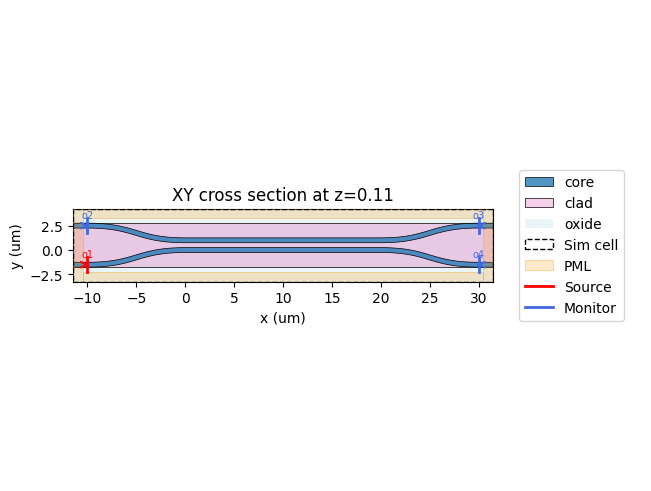
For an interactive preview, use plot_2d_interactive(). It returns a Plotly
figure where you can zoom, pan, and toggle individual layers, materials, PML
regions, and ports on/off via the legend.
materials.py:541: DispersionCoverageWarning: no dispersion model covers wavelength=1.55 um (frequency=1.93414e+14 Hz); models: sellmeier (2.5-12 um). Base permittivity/conductivity are not validated at this wavelength
  resolved = resolve_material_at_wavelength(
materials.py:449: DispersionCoverageWarning: no dispersion model covers wavelength=1.55 um (frequency=1.93414e+14 Hz); models: sellmeier (2.5-12 um). Base permittivity/conductivity are not validated at this wavelength
  resolved = resolve_material_at_wavelength(
Run 2D simulation on cloud
  meep-52484d2b  [####################] 100%  complete  elapsed 0m 00s


Extracting results.tar.gz...
Downloaded 4 files to sim-data-meep-52484d2b