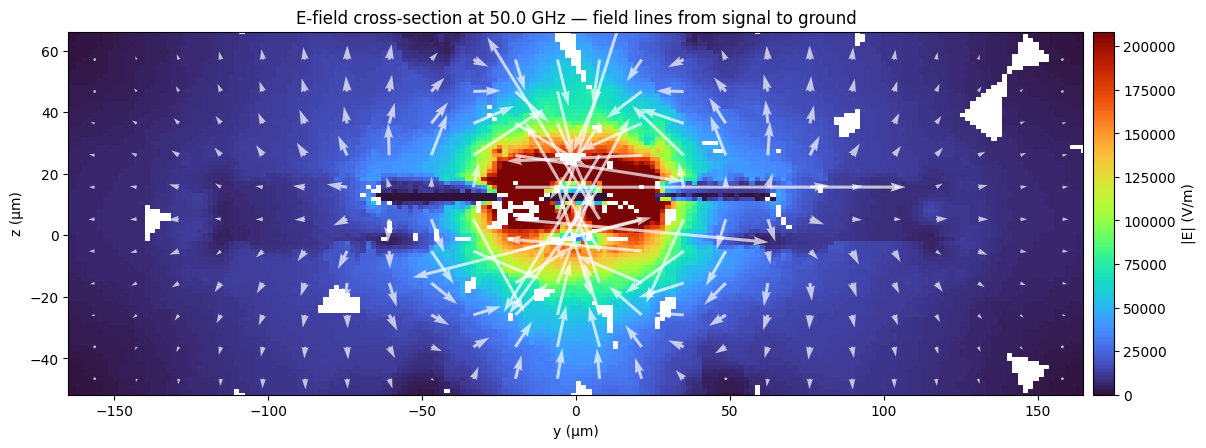
Palace Field Visualization
Top-view and cross-section visualization of electromagnetic fields from a Palace driven simulation on a CPW (coplanar waveguide) structure at 50 GHz.
Requirements:
- IHP PDK:
uv pip install ihp-gdsfactory - GDSFactory+ account for cloud simulation
Note: This notebook now uses :func:gsim.palace.fields.plot_boundary_field
for NaN-free direct-mesh rendering (replaces the old probe-grid resampling
approach that produced NaN values and poor-quality plots).
Simulation setup
import gdsfactory as gf
from ihp import LAYER, PDK

from gsim.common.stack import get_stack
from gsim.palace import DrivenSim

PDK.activate()


@gf.cell
def gsg_electrode(
    length=300, s_width=20, g_width=40, gap_width=15, layer=LAYER.TopMetal2drawing
):
    c = gf.Component()
    r1 = c << gf.c.rectangle((length, g_width), centered=True, layer=layer)
    r1.move((0, (g_width + s_width) / 2 + gap_width))
    _r2 = c << gf.c.rectangle((length, s_width), centered=True, layer=layer)
    r3 = c << gf.c.rectangle((length, g_width), centered=True, layer=layer)
    r3.move((0, -(g_width + s_width) / 2 - gap_width))
    c.add_port(
        name="o1",
        center=(-length / 2, 0),
        width=s_width,
        orientation=180,
        port_type="electrical",
        layer=layer,
    )
    c.add_port(
        name="o2",
        center=(length / 2, 0),
        width=s_width,
        orientation=0,
        port_type="electrical",
        layer=layer,
    )
    return c


sim = DrivenSim()
sim.set_output_dir("./palace-sim-cpw-fields")
sim.set_geometry(gsg_electrode())

stack = get_stack(
    include_substrate=True, substrate_thickness=2.0
)  # auto-detects active PDK
sim.set_stack(stack)

sim.add_cpw_port("o1", layer="topmetal2", s_width=20, gap_width=15)
sim.add_cpw_port("o2", layer="topmetal2", s_width=20, gap_width=15)

# Single frequency point at 50 GHz, adaptive off so Palace does a full solve
sim.set_driven(
    f=50e9,
    adaptive_tol=0,
    save_step=1,
)
sim.set_airbox(margin_x=50, margin_y=0, z_above=100, z_below=100)
sim.mesh(
    preset="default",
    refined_mesh_size=2.0,
    max_mesh_size=25.0,
)
Mesh Summary
========================================
Dimensions: 400.0 x 130.0 x 217.9 µm
Nodes:      15,123
Elements:   112,443
Tetrahedra: 81,295
Edge length: 1.12 - 51.62 µm
Quality:    0.644 (min: 0.042)
SICN:       0.691 (all valid)
Worst element distortion, κ: 68.3442 (tet centers; 1 is ideal)
Estimated Field DOFs: 528,934 (order 2; before Palace preprocessing)
Mesh hash:  sha256:f77cb0356ac8509b  (gmsh 4.15.2, gsim 0.8.0)
Mesher:     2D algorithm 5, 3D algorithm 1, threads 1 (1D/2D/3D limits 1/1/1)
----------------------------------------
Volumes (4):
  - silicon [1]
  - sio2 [2]
  - sin [3]
  - air [4]
Surfaces (15):
  - topmetal2_xy [5]
  - topmetal2_z [6]
  - P1_E0 [7]
  - P1_E1 [8]
  - P2_E0 [9]
  - P2_E1 [10]
  - air__silicon [11]
  - silicon__None [12]
  - silicon__sio2 [13]
  - air__sio2 [14]
  - sio2__None [15]
  - sin__sio2 [16]
  - air__sin [17]
  - sin__None [18]
  - air__None [19]
----------------------------------------
Mesh:   palace-sim-cpw-fields/palace.msh
  palace-0ab40694  [####################] 100%  complete  elapsed 0m 00s


Extracting results.tar.gz...


Downloaded 45 files to sim-data-palace-0ab40694
Load results and setup
from pathlib import Path

import numpy as np
import pyvista as pv

# New NaN-free field-visualization module (replaces old gsim.viz.plot_topview/plot_cross_section)
from gsim.palace.fields import (
    load_boundary_field_data,
    load_field_context,
    load_volume_field_data,
    plot_boundary_field,
    plot_volume_slice,
)

pv.OFF_SCREEN = True

# Get results dir from sim output (or hardcode for re-runs)
results_dir = Path(results.files["port-S.csv"]).parent
print(f"Results dir: {results_dir}")

# Read frequency from S-parameter CSV
s_csv = np.loadtxt(results_dir / "port-S.csv", delimiter=",", skiprows=1, ndmin=2)
freq_ghz = s_csv[0, 0]

# Load volume + boundary meshes and build the SelectorContext in one call
field_excitation = 2  # Palace retains fields for the final active excitation
vol, bnd, ctx, pg_map = load_field_context(results_dir, excitation=field_excitation)

print(f"Frequency: {freq_ghz:.1f} GHz")
print(f"Volume: {vol.n_points:,} points, {vol.n_cells:,} cells")
print(f"Boundary: {bnd.n_points:,} points, {bnd.n_cells:,} cells")

# Resolve topmetal2_xy attributes for surface-current plot
topmetal2_attrs = [
    int(tag) for name, tag in pg_map.items() if "topmetal2_xy" in name.lower()
]
print(f"topmetal2_xy attributes: {topmetal2_attrs}")
print(f"Known entity names: {sorted(pg_map.keys())}")

# Top-view conductor z-plane
z_conductor = 16.0
Results dir: output


Frequency: 50.0 GHz
Volume: 812,950 points, 81,295 cells
Boundary: 233,424 points, 38,904 cells
topmetal2_xy attributes: [5]
Known entity names: ['P1_E0', 'P1_E1', 'P2_E0', 'P2_E1', 'air', 'air__None', 'air__silicon', 'air__sin', 'air__sio2', 'silicon', 'silicon__None', 'silicon__sio2', 'sin', 'sin__None', 'sin__sio2', 'sio2', 'sio2__None', 'topmetal2_xy', 'topmetal2_z']
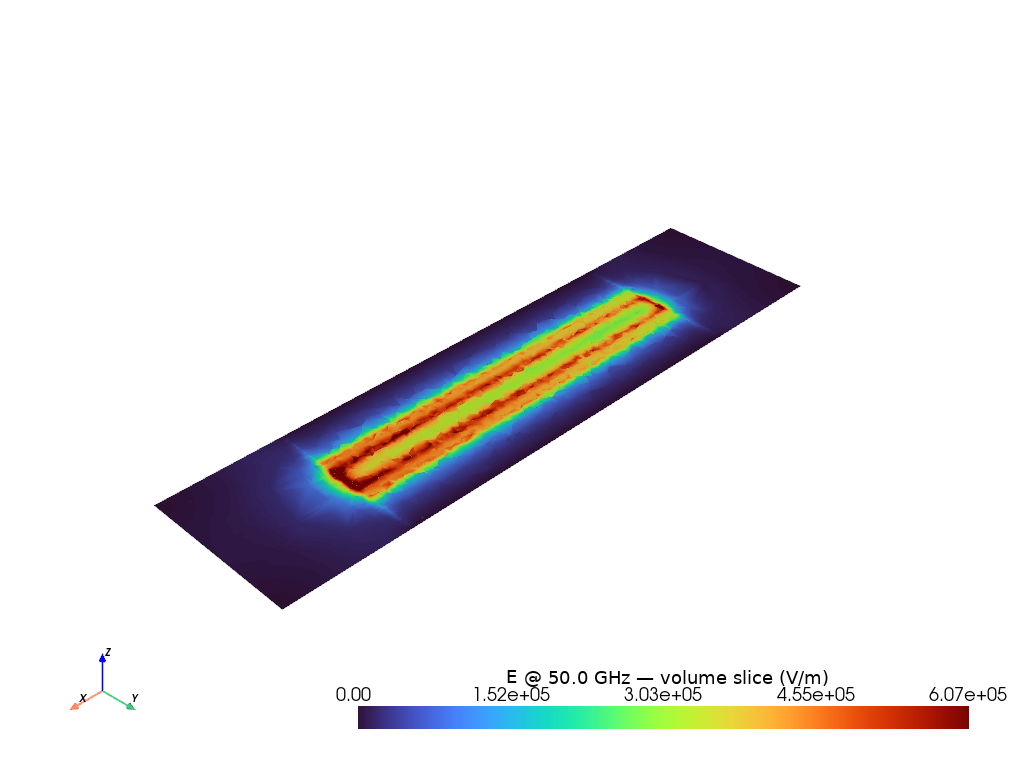
Top-view volume slices at conductor layer (NaN-free direct mesh rendering)
# |E| volume slice at z_conductor — uses extract_axis_slice + direct mesh rendering (no NaN)
vol_data = load_volume_field_data(results_dir, excitation=field_excitation)

pl_e = plot_volume_slice(
    vol_data,
    vector_field="E_real",
    component="mag",
    axis="z",
    value=z_conductor,
    cmap="turbo",
    scalar_bar_title=f"|E| @ {freq_ghz:.1f} GHz — volume slice (V/m)",
    off_screen=True,
)
pl_e.show(jupyter_backend="static")
[0m[33m2026-10-23 15:33:58.368 ( 14.407s) [ 7FBF0E9DD080]vtkXOpenGLRenderWindow.:1452 WARN| bad X server connection. DISPLAY=[0m
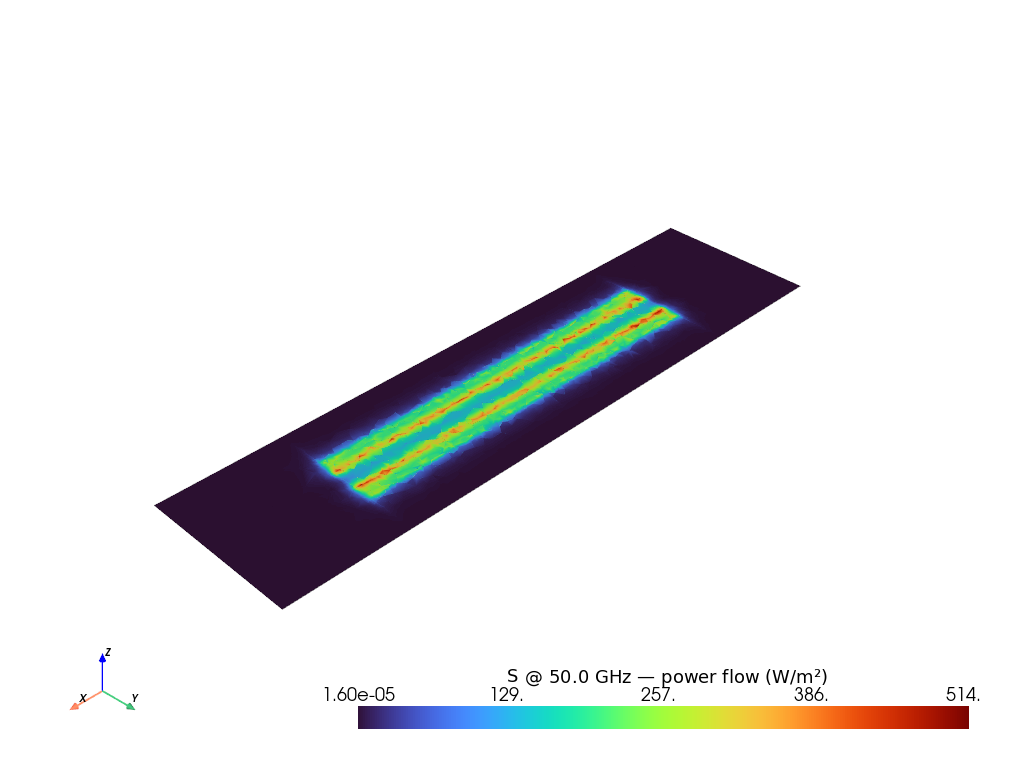
# |S| Poynting vector — power flow along the waveguide
pl_s_vol = plot_volume_slice(
    vol_data,
    vector_field="S",
    component="mag",
    axis="z",
    value=z_conductor,
    cmap="turbo",
    scalar_bar_title=f"|S| @ {freq_ghz:.1f} GHz — power flow (W/m²)",
    off_screen=True,
)
pl_s_vol.show(jupyter_backend="static")
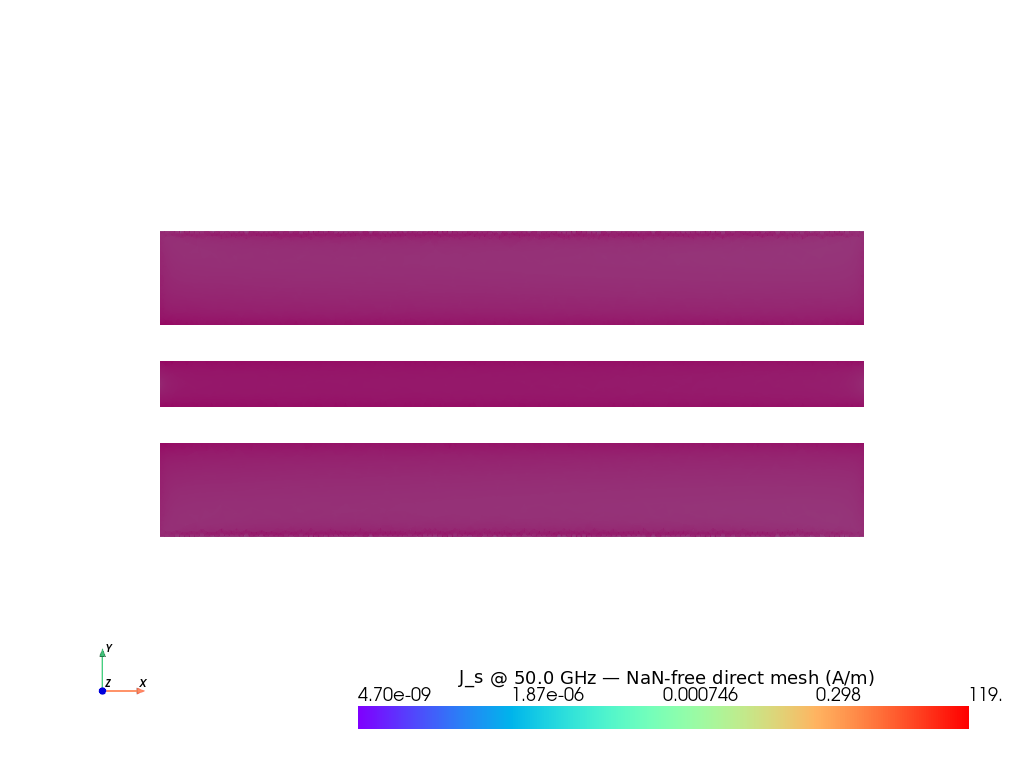
Surface-current boundary plot (NaN-free direct mesh rendering)
This uses :func:gsim.palace.fields.plot_boundary_field which renders the
actual boundary mesh cells directly — no resampling to a regular grid —
so there are zero NaN values.
# Load boundary field data — only topmetal2_xy conductor faces
bnd_data = load_boundary_field_data(
    results_dir,
    ctx,
    attributes=topmetal2_attrs,
    excitation=field_excitation,
)

print(
    f"Boundary mesh: {bnd_data.mesh.n_points:,} points, {bnd_data.mesh.n_cells:,} cells"
)
print(f"Available fields: {sorted(bnd_data.point_arrays)}")

# Explicit NaN check — the whole point
if "J_s_real" in bnd_data.point_arrays:
    from gsim.palace.fields import activate_vector_component

    scalar_name = activate_vector_component(bnd_data.mesh, "J_s_real", component="mag")
    n_nan = int(np.isnan(bnd_data.mesh.point_data[scalar_name]).sum())
    print(f"  NaN count in |J_s_real|: {n_nan} / {bnd_data.mesh.n_points:,} points")
    assert n_nan == 0, f"Expected 0 NaN values, got {n_nan}"
Boundary mesh: 95,616 points, 15,936 cells
Available fields: ['B_imag', 'B_real', 'E_imag', 'E_real', 'J_s_imag', 'J_s_real', 'Q_s_imag', 'Q_s_real', 'S', 'U_e', 'U_m', 'vtkOriginalPointIds']
  NaN count in |J_s_real|: 0 / 95,616 points
# Plot surface current — NO NaN, direct mesh rendering
pl = plot_boundary_field(
    bnd_data,
    vector_field="J_s_real",
    component="mag",
    cmap="rainbow",
    log_scale=False,
    opacity=0.95,
    scalar_bar_title=f"|J_s| @ {freq_ghz:.1f} GHz — NaN-free direct mesh (A/m)",
    show_edges=False,
    off_screen=True,
)

# Orthographic top view
bounds = bnd_data.mesh.bounds
cx = 0.5 * (bounds[0] + bounds[1])
cy = 0.5 * (bounds[2] + bounds[3])
cz = 0.5 * (bounds[4] + bounds[5])
span_xy = max(bounds[1] - bounds[0], bounds[3] - bounds[2])
pl.camera_position = (cx, cy, cz + span_xy * 3.0)
pl.camera.focal_point = (cx, cy, cz)
pl.camera.up = (0.0, 1.0, 0.0)
pl.enable_parallel_projection()

pl.show(jupyter_backend="static")
[0m[33m2026-10-23 15:34:03.961 ( 20.000s) [ 7FBF0E9DD080] vtkRenderer.cxx:1141 WARN| vtkOpenGLRenderer (0x450cacb0): Resetting view-up since view plane normal is parallel[0m
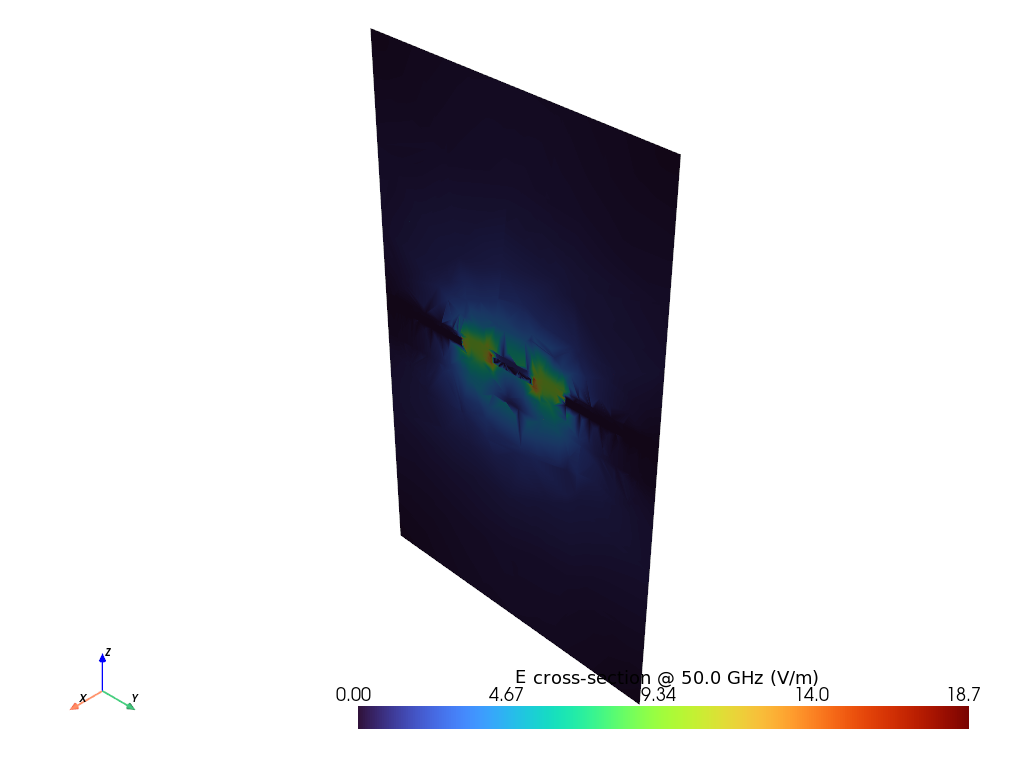
Cross-sections — YZ plane at x=0
# |E| cross-section — uses 3D volume slice + direct mesh rendering
pl_cs_e = plot_volume_slice(
    vol_data,
    vector_field="E_real",
    component="mag",
    axis="x",
    value=0.0,
    cmap="turbo",
    scalar_bar_title=f"|E| cross-section @ {freq_ghz:.1f} GHz (V/m)",
    off_screen=True,
)

# Camera looks straight into the YZ plane (down the +X axis toward x=0)
_b = pl_cs_e.mesh.bounds
_cx, _cy, _cz = 0.0, 0.5 * (_b[2] + _b[3]), 0.5 * (_b[4] + _b[5])
_span_yz = max(_b[3] - _b[2], _b[5] - _b[4])
pl_cs_e.camera.position = (_cx + _span_yz * 3.0, _cy, _cz)
pl_cs_e.camera.focal_point = (_cx, _cy, _cz)
pl_cs_e.camera.up = (0.0, 0.0, 1.0)
pl_cs_e.enable_parallel_projection()

pl_cs_e.show(jupyter_backend="static")
# |B| cross-section — magnetic field circulating around conductor
pl_cs_b = plot_volume_slice(
    vol_data,
    vector_field="B_real",
    component="mag",
    axis="x",
    value=0.0,
    cmap="turbo",
    scalar_bar_title=f"|B| cross-section @ {freq_ghz:.1f} GHz (T)",
    off_screen=True,
)

# Camera looks straight into the YZ plane (down the +X axis toward x=0)
_b = pl_cs_b.mesh.bounds
_cx, _cy, _cz = 0.0, 0.5 * (_b[2] + _b[3]), 0.5 * (_b[4] + _b[5])
_span_yz = max(_b[3] - _b[2], _b[5] - _b[4])
pl_cs_b.camera.position = (_cx + _span_yz * 3.0, _cy, _cz)
pl_cs_b.camera.focal_point = (_cx, _cy, _cz)
pl_cs_b.camera.up = (0.0, 0.0, 1.0)
pl_cs_b.enable_parallel_projection()

pl_cs_b.show(jupyter_backend="static")
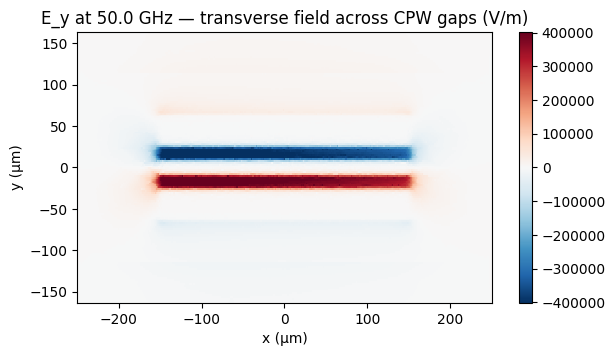
Field components — E_y at conductor layer
E_y is the dominant E-field component in a CPW — the transverse field across
the gaps between signal and ground. A diverging colormap shows the polarity
flipping between the two gaps.
# E_y component via plot_volume_slice with vector component 'y'
pl_ey = plot_volume_slice(
    vol_data,
    vector_field="E_real",
    component="y",
    axis="z",
    value=z_conductor,
    cmap="RdBu_r",
    scalar_bar_title=f"E_y @ {freq_ghz:.1f} GHz — transverse field (V/m)",
    off_screen=True,
)
pl_ey.show(jupyter_backend="static")