Propagate Modes
Propagate a modal excitation through a stack of cells using the simplified
propagate_modesAPI
1. Structure
We use a short linear taper so the field profile evolves along z.
def create_structures(length=10.0, input_width=0.45, output_width=1.0):
    oxide = mw.Structure(
        material=mw.silicon_oxide,
        geometry=mw.Prism(
            poly=np.array([(0, -2.1), (length, -2.1), (length, 2.1), (0, 2.1)]),
            h_min=-3.0,
            h_max=0.0,
            axis="y",
        ),
    )

    core = mw.Structure(
        material=mw.silicon,
        geometry=mw.Prism(
            poly=np.array(
                [
                    (0, -input_width / 2),
                    (length, -output_width / 2),
                    (length, output_width / 2),
                    (0, input_width / 2),
                ]
            ),
            h_min=0.0,
            h_max=0.22,
            axis="y",
        ),
    )

    return [oxide, core]


structures = create_structures()
mw.visualize(structures)
2. Cells And Modes
The only required inputs to mw.propagate_modes are:
modes: one mode set per cellcells: the corresponding EME cells
length = 10.0
num_cells = 8

cells = mw.create_cells(
    structures=structures,
    mesh=mw.Mesh2D(
        x=np.linspace(-2.0, 2.0, 121),
        y=np.linspace(-2.0, 2.0, 121),
    ),
    Ls=np.full(num_cells, length / num_cells),
)

env = mw.Environment(wl=1.55, T=25.0)
cross_sections = [mw.CrossSection.from_cell(cell=cell, env=env) for cell in cells]
modes = [mw.compute_modes(cs, num_modes=4) for cs in cross_sections]

print(f"Computed {len(modes)} mode sets with {len(modes[0])} modes in the first cell.")
Computed 8 mode sets with 4 modes in the first cell.
3. Propagate A Fundamental Excitation
By default, mw.propagate_modes excites left mode 0 with unit amplitude and applies no right-side excitation.
Here we only pass z and y so the returned field can be plotted on a known grid.
z = np.linspace(cells[0].z_min, cells[-1].z_max, 500)
y = 0.0

field, x = mw.propagate_modes(modes, cells, y=y, z=z)
print(field.shape, x.shape)
(500, 120) (120,)
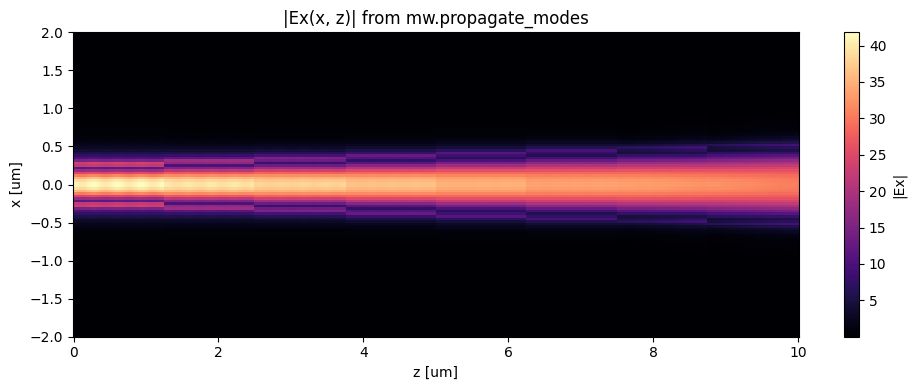
4. Plot The Reconstructed Field Slice
The returned array is an Ex(z, x) slice through the device.
fig, ax = plt.subplots(figsize=(10, 4))
im = ax.pcolormesh(z, x, np.abs(field).T, shading="auto", cmap="magma")
ax.set_xlabel("z [um]")
ax.set_ylabel("x [um]")
ax.set_title("|Ex(x, z)| from mw.propagate_modes")
plt.colorbar(im, ax=ax, label="|Ex|")
plt.tight_layout()