
Circuit Simulation with QPDK#
Required extras
This notebook needs the models extra:
uv add "qpdk[models]"
# or, from a checkout of this repository:
uv sync --extra models
# or with pip:
pip install "qpdk[models]"
See the extras reference for what each extra installs.
This notebook demonstrates how to perform circuit simulations using the qpdk models and the sax circuit solver. We will showcase individual components and then combine them to create a custom resonator circuit.
Setup#
First, let’s define a frequency range for our simulations and create a coplanar waveguide (CPW) media that defines the transmission line properties.
# Define frequency range
freq = jnp.linspace(2e9, 8e9, 501)
freq_ghz = freq / 1e9

# Define CPW media
cross_section = coplanar_waveguide(width=10, gap=6)
Individual Component Models#
Let’s simulate some of the basic components available in qpdk.
Straight Waveguide#
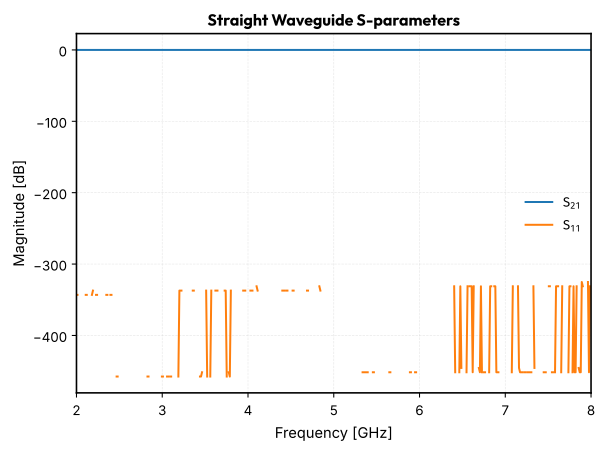
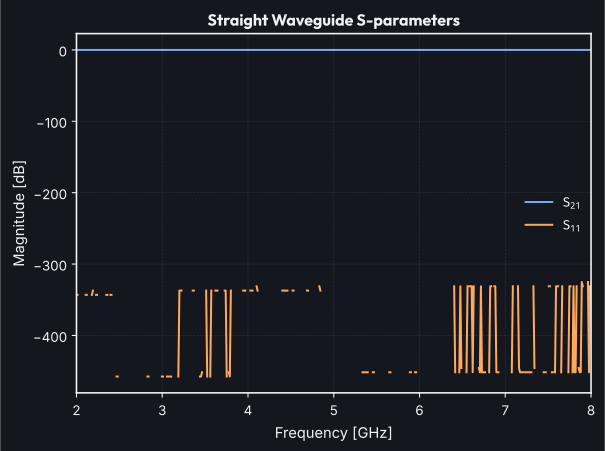
Simulate a \(1\,\text{mm}\) straight waveguide
straight_wg = straight(f=freq, length=1000, cross_section=cross_section)

# Plot S-parameters
plt.figure()
plt.title("Straight Waveguide S-parameters")
plt.plot(freq_ghz, 20 * jnp.log10(jnp.abs(straight_wg["o1", "o2"])), label="$S_{21}$")
plt.plot(freq_ghz, 20 * jnp.log10(jnp.abs(straight_wg["o1", "o1"])), label="$S_{11}$")
plt.xlabel("Frequency [GHz]")
plt.ylabel("Magnitude [dB]")
plt.grid(True)
plt.legend()
plt.show()
Capacitor#
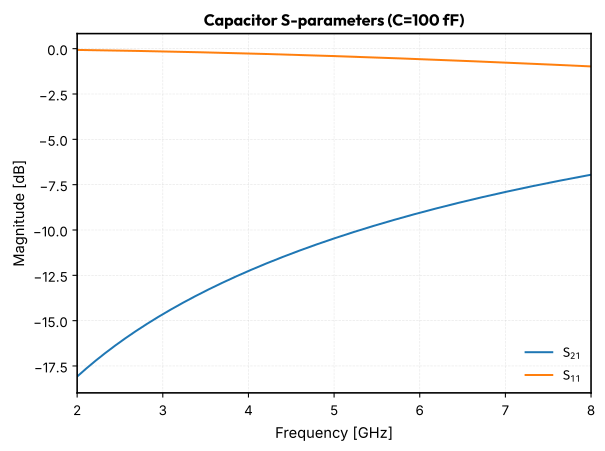
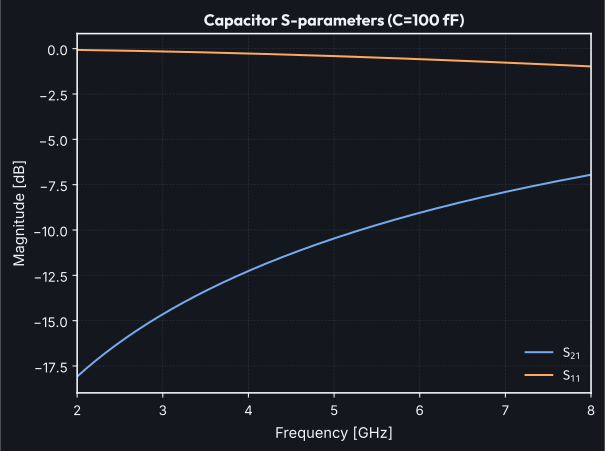
Simulate a \(100\,\text{fF}\) capacitor
cap_val = 100e-15
cap = capacitor(f=freq, capacitance=cap_val, z0=50)

# Plot S-parameters
plt.figure()
plt.title(f"Capacitor S-parameters (C={cap_val * 1e15:.0f} fF)")
plt.plot(freq_ghz, 20 * jnp.log10(jnp.abs(cap["o1", "o2"])), label="$S_{21}$")
plt.plot(freq_ghz, 20 * jnp.log10(jnp.abs(cap["o1", "o1"])), label="$S_{11}$")
plt.xlabel("Frequency [GHz]")
plt.ylabel("Magnitude [dB]")
plt.grid(True)
plt.legend()
plt.show()
Inductor#
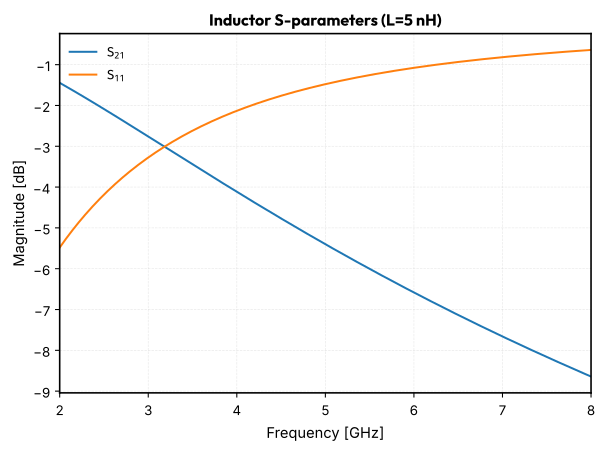
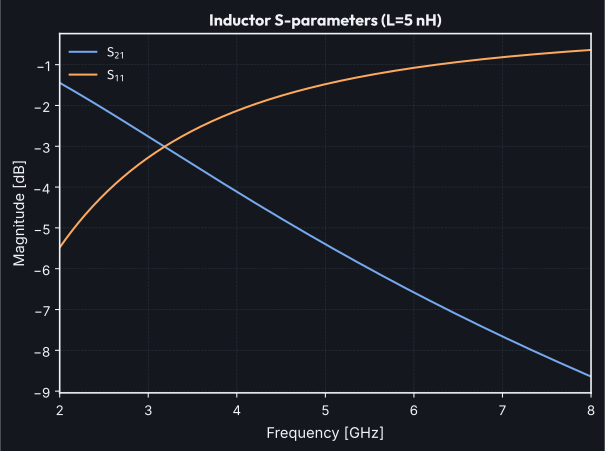
Simulate a \(5\,\text{nH}\) inductor
ind_val = 5e-9
ind = inductor(f=freq, inductance=ind_val, z0=50)

# Plot S-parameters
plt.figure()
plt.title(f"Inductor S-parameters (L={ind_val * 1e9:.0f} nH)")
plt.plot(freq_ghz, 20 * jnp.log10(jnp.abs(ind["o1", "o2"])), label="$S_{21}$")
plt.plot(freq_ghz, 20 * jnp.log10(jnp.abs(ind["o1", "o1"])), label="$S_{11}$")
plt.xlabel("Frequency [GHz]")
plt.ylabel("Magnitude [dB]")
plt.grid(True)
plt.legend()
plt.show()
Coupled Resonator Model#
Now let’s use a more complex, pre-built model for a coupled resonator.
# Simulate a coupled resonator
res = quarter_wave_resonator_coupled(
    f=freq,
    cross_section=cross_section,
    coupling_gap=0.3,
    coupling_straight_length=200,
    length=5000,
)

# Plot S-parameters
plt.figure()
plt.title("Coupled Resonator S-parameters")
plt.plot(
    freq_ghz,
    20 * jnp.log10(jnp.abs(res["coupling_o1", "coupling_o2"])),
    label="$S_{21}$",
)
plt.xlabel("Frequency [GHz]")
plt.ylabel("Magnitude [dB]")
plt.grid(True)
plt.legend()
plt.show()
Building a Custom Resonator Circuit#
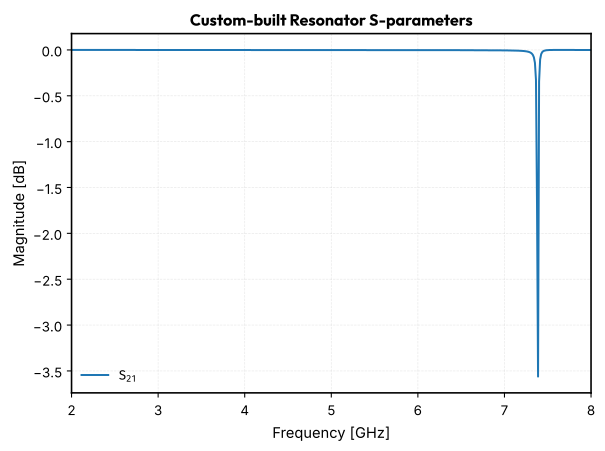
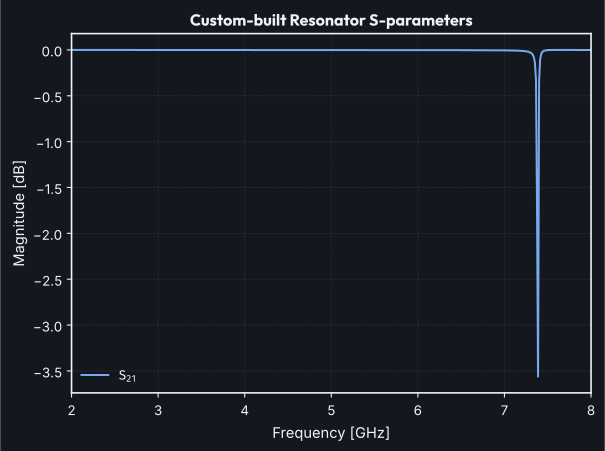
We can use sax to build our own circuits from basic components. Let’s build a quarter-wave resonator capacitively coupled to a feedline.
The circuit is a feedline with a T-junction. A series combination of a capacitor and a shorted transmission line (the resonator) is connected to the T-junction as a shunt element.
# Define component settings
feedline_segment_length = 500  # um
resonator_length = 4000  # um
coupling_cap_val = 20e-15  # F

# Define models for sax circuit
models: sax.Models = {
    "straight": straight,
    "capacitor": capacitor,
    "straight_shorted": straight_shorted,
    "tee": tee,
}

# Define netlist
netlist = {
    "instances": {
        "feedline1": {
            "component": "straight",
            "settings": {"length": feedline_segment_length, "media": cross_section},
        },
        "feedline2": {
            "component": "straight",
            "settings": {"length": feedline_segment_length, "media": cross_section},
        },
        "cap": {
            "component": "capacitor",
            "settings": {"capacitance": coupling_cap_val, "z0": 50},
        },
        "res": {
            "component": "straight_shorted",
            "settings": {"length": resonator_length, "media": cross_section},
        },
        "tee": "tee",
    },
    "connections": {
        "feedline1,o2": "tee,o1",
        "tee,o2": "feedline2,o1",
        "tee,o3": "cap,o1",
        "cap,o2": "res,o1",
    },
    "ports": {
        "o1": "feedline1,o1",
        "o2": "feedline2,o2",
    },
}

# Create and run the circuit
custom_resonator_circuit, _ = sax.circuit(netlist=netlist, models=models)
custom_res_s_params = custom_resonator_circuit(f=freq)

# Plot S-parameters
plt.figure()
plt.title("Custom-built Resonator S-parameters")
plt.plot(
    freq_ghz,
    20 * jnp.log10(jnp.abs(custom_res_s_params["o1", "o2"])),
    label="$S_{21}$",
)
plt.xlabel("Frequency [GHz]")
plt.ylabel("Magnitude [dB]")
plt.grid(True)
plt.legend()
plt.show()