Ansys HFSS, Q3D and 2D Extractor with PyAEDT
gplugins.ansys wraps PyAEDT applications so a gdsfactory
component can be imported into Ansys Electronics Desktop with its layer stack and materials.
You open the AEDT session yourself and hand the application to a wrapper:
gplugins.ansys.HFSSimports a component as 3D objects or PEC sheets, adds lumped ports and an air region, and reads eigenmode or S-parameter results.gplugins.ansys.Q3Dimports a component, assigns one signal net per port, and reads the capacitance matrix.gplugins.ansys.Q2Ddraws a coplanar waveguide cross section for impedance extraction.
The layer-stack mapping and port geometry run anywhere. Anything that talks to AEDT needs a local
installation and licence, so those cells are behind RUN_AEDT and are off by default.
Fully solved examples live in the Quantum RF PDK documentation: HFSS driven capacitor, HFSS eigenmode resonator and Q2D CPW impedance.
import gdsfactory as gf
import matplotlib.pyplot as plt
from gdsfactory.gpdk import PDK
from gdsfactory.technology import LayerLevel, LayerStack
from matplotlib.patches import Polygon, Rectangle

from gplugins.ansys import (
    layer_stack_to_gds_mapping,
    lumped_port_rectangle_from_cpw,
    object_names_to_materials,
)

PDK.activate()

#: Set to True on a machine with Ansys Electronics Desktop and a licence.
RUN_AEDT = False
#: AEDT release to start, e.g. "2025.2".
AEDT_VERSION = "2025.2"

METAL = (1, 0)
SUBSTRATE_LAYER = (99, 0)
Layer stack and materials
AEDT's GDS importer places each GDS layer number at one elevation and thickness, so the layer
stack is turned into a {layer_number: (elevation, thickness)} map. Vacuum levels are skipped,
and levels that share a layer number are merged when their spans join, or rejected when they
cannot be told apart.
Materials come from a material_properties table. A material with infinite relative
permittivity is a perfect conductor and becomes pec in AEDT; anything else keeps its name and
permittivity. gplugins.ansys.DEFAULT_MATERIAL_PROPERTIES covers common names; pass your own
table to the wrappers to change it.
stack = LayerStack(
    layers={
        "substrate": LayerLevel(
            layer=SUBSTRATE_LAYER, zmin=-500.0, thickness=500.0, material="si"
        ),
        "metal": LayerLevel(layer=METAL, zmin=0.0, thickness=0.2, material="Nb"),
    }
)
print(layer_stack_to_gds_mapping(stack))
print(object_names_to_materials(["metal", "substrate"], stack))
{99: (-500.0, 500.0), 1: (0.0, 0.2)}
{'metal': 'pec', 'substrate': 'si'}
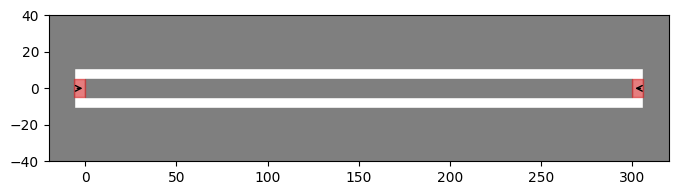
A coplanar waveguide
A 10 µm centre conductor in a 6 µm gap, cut into a ground plane that also closes around both
ends, with a port at each end of the centre conductor. lumped_port_rectangle_from_cpw places
each lumped port in the end gap, between the port and the ground, with an integration line from
the ground to the signal.
LENGTH = 300.0
CPW_WIDTH = 10.0
CPW_GAP = 6.0
GROUND_WIDTH = 100.0


def _box(x0: float, y0: float, x1: float, y1: float) -> gf.kdb.DBox:
    return gf.kdb.DBox(x0, y0, x1, y1)


@gf.cell
def cpw_with_ground() -> gf.Component:
    c = gf.Component()
    inner = CPW_WIDTH / 2 + CPW_GAP
    outer = inner + GROUND_WIDTH
    ground = gf.kdb.Region(_box(-GROUND_WIDTH, -outer, LENGTH + GROUND_WIDTH, outer).to_itype(c.kcl.dbu))
    trench = gf.kdb.Region(_box(-CPW_GAP, -inner, LENGTH + CPW_GAP, inner).to_itype(c.kcl.dbu))
    signal = gf.kdb.Region(_box(0, -CPW_WIDTH / 2, LENGTH, CPW_WIDTH / 2).to_itype(c.kcl.dbu))
    c.add_polygon(ground - trench + signal, layer=METAL)
    c.add_port("o1", center=(0, 0), width=CPW_WIDTH, orientation=180, layer=METAL)
    c.add_port("o2", center=(LENGTH, 0), width=CPW_WIDTH, orientation=0, layer=METAL)
    return c


component = cpw_with_ground()

fig, ax = plt.subplots(figsize=(8, 4))
for points in component.get_polygons_points(layers=[METAL], by="tuple")[METAL]:
    ax.add_patch(Polygon(points, color="tab:grey"))
for port in component.ports:
    rect = lumped_port_rectangle_from_cpw(
        (*port.center, 0.0), port.orientation, CPW_GAP, CPW_WIDTH
    )
    (x, y, _), (dx, dy) = rect["origin"], rect["sizes"]
    ax.add_patch(Rectangle((x, y), dx, dy, color="tab:red", alpha=0.6))
    (x0, y0, _), (x1, y1, _) = rect["integration_line"]
    ax.annotate("", (x1, y1), (x0, y0), arrowprops={"arrowstyle": "->"})
    print(port.name, rect)
ax.set_xlim(-20, LENGTH + 20)
ax.set_ylim(-40, 40)
ax.set_aspect("equal")
o1 {'origin': [np.float64(-6.0), np.float64(-5.0), 0.0], 'sizes': [np.float64(6.0), np.float64(10.0)], 'integration_line': [[np.float64(-6.0), np.float64(0.0), 0.0], [0.0, 0.0, 0.0]]}
o2 {'origin': [np.float64(300.0), np.float64(-5.0), 0.0], 'sizes': [np.float64(6.0), np.float64(10.0)], 'integration_line': [[np.float64(306.0), np.float64(0.0), 0.0], [300.0, 0.0, 0.0]]}
HFSS driven modal
The metal is imported as PEC sheets on a silicon substrate, inside a vacuum box with a radiation boundary. Solver settings are plain PyAEDT.
if RUN_AEDT:
    from ansys.aedt.core import Hfss

    from gplugins.ansys import HFSS, detach_desktop_logging

    hfss = Hfss(
        design="CPW",
        solution_type="DrivenModal",
        non_graphical=True,
        new_desktop=True,
        version=AEDT_VERSION,
    )
    # PyAEDT reads the desktop on every log message, which can drop the session.
    detach_desktop_logging(hfss)
    sim = HFSS(hfss, layer_stack=stack)
    sim.import_component(component, import_as_sheets=True)
    sim.add_substrate(component, thickness=500.0, material="silicon")
    air = sim.add_air_region(component, height=500.0, substrate_thickness=500.0)
    hfss.assign_radiation_boundary_to_objects(air)
    sim.add_lumped_ports(component.ports, CPW_GAP, CPW_WIDTH)

    setup = hfss.create_setup(name="DrivenSetup", Frequency="6GHz")
    setup.create_frequency_sweep(
        unit="GHz",
        name="FrequencySweep",
        start_frequency=1.0,
        stop_frequency=10.0,
        sweep_type="Interpolating",
        num_of_freq_points=201,
    )
    hfss.analyze_setup("DrivenSetup")
    print(sim.get_sparameter_results("DrivenSetup", "FrequencySweep"))
    hfss.release_desktop()
else:
    print("RUN_AEDT is False; skipping HFSS.")
RUN_AEDT is False; skipping HFSS.
Q3D capacitance
Q3D needs one net per conductor. assign_nets_from_ports names the conductor nearest each port
after the port; the rest stay as auto-identified nets. Here both ports sit on the one centre
conductor, so it becomes net o1 and o2 is skipped with a warning.
if RUN_AEDT:
    from ansys.aedt.core import Q3d

    from gplugins.ansys import Q3D, detach_desktop_logging

    q3d = Q3d(design="CPW_Q3D", non_graphical=True, new_desktop=True, version=AEDT_VERSION)
    detach_desktop_logging(q3d)
    q3d_sim = Q3D(q3d, layer_stack=stack)
    conductors = q3d_sim.import_component(component)
    q3d_sim.add_substrate(component, thickness=500.0, material="silicon")
    q3d_sim.assign_nets_from_ports(component.ports, conductors)

    q3d_setup = q3d.create_setup(name="Q3DSetup")
    q3d_setup.ac_rl_enabled = False
    q3d_setup.dc_enabled = False
    q3d_setup.capacitance_enabled = True
    q3d_setup.update()
    q3d.analyze_setup("Q3DSetup")
    print(q3d_sim.get_capacitance_matrix("Q3DSetup"))
    q3d.release_desktop()
else:
    print("RUN_AEDT is False; skipping Q3D.")
RUN_AEDT is False; skipping Q3D.
2D Extractor impedance
create_2d_cpw reads the substrate and conductor thickness and material from the named layer
stack levels. Conductors thinner than 2 µm are thickened for solver stability.
if RUN_AEDT:
    from ansys.aedt.core import Q2d

    from gplugins.ansys import Q2D, detach_desktop_logging

    q2d = Q2d(design="CPW_Q2D", non_graphical=True, new_desktop=True, version=AEDT_VERSION)
    detach_desktop_logging(q2d)
    Q2D(q2d, layer_stack=stack).create_2d_cpw(
        CPW_WIDTH, CPW_GAP, substrate_level="substrate", conductor_level="metal"
    )
    q2d_setup = q2d.create_setup(name="Q2DSetup")
    q2d.analyze_setup("Q2DSetup")
    data = q2d.post.get_solution_data(
        expressions="Z0(signal,signal)", setup_sweep_name="Q2DSetup : LastAdaptive"
    )
    _, z0 = data.get_expression_data(formula="real")
    print(f"Z0 = {z0[0]:.2f} Ohm")
    q2d.release_desktop()
else:
    print("RUN_AEDT is False; skipping Q2D.")
RUN_AEDT is False; skipping Q2D.