COMSOL simulations with MPh
gplugins.comsol turns a gdsfactory component into a COMSOL model through
MPh, the Python client for the COMSOL Java API.
The geometry step is pure Python and runs anywhere. Building and solving needs a local COMSOL
installation and licence, so those cells are behind RUN_COMSOL and are off by default.
The workflow is:
gplugins.comsol.layout.prepare_comsol_layoutextracts the positive metal on one layer, plus optional feed ports, into agplugins.comsol.layout.ComsolLayout.gplugins.comsol.model.COMSOL.create_sheetputs that metal as zero-thickness sheets on the interface between an air block and a silicon block.- A study is added on top:
gplugins.comsol.model.COMSOL.add_cpw_rf_studyfor a driven two-port CPW, orgplugins.comsol.model.COMSOL.add_capacitance_studyfor an electrostatic capacitance. - MPh's own
solve/evaluate/savedo the rest.
Fully solved examples, with saved results, live in the Quantum RF PDK documentation: driven CPW resonator and qubit capacitance. That PDK draws negative etch masks, so its wrapper inverts them before calling the extraction shown here.
import gdsfactory as gf
import matplotlib.pyplot as plt
import numpy as np
from gdsfactory.gpdk import PDK

from gplugins.comsol import COMSOL, prepare_comsol_layout
from gplugins.comsol.plotting import draw_layout_polygons

PDK.activate()

#: Set to True on a machine with COMSOL and a licence to build and solve.
RUN_COMSOL = False

METAL = (1, 0)

# MPh allows one client per Python session, so it is started once here and
# reused by both solves below.
client = None
if RUN_COMSOL:
    import mph

    client = mph.start()
A coplanar waveguide
The extraction expects the physical metal, ground plane included, on a single layer. Here a 10 µm centre conductor sits in a 6 µm gap between two ground planes, and the ground runs past the two feed ports.
LENGTH = 300.0
CPW_WIDTH = 10.0
CPW_GAP = 6.0
GROUND_WIDTH = 100.0
OVERHANG = 50.0


@gf.cell
def cpw_with_ground() -> gf.Component:
    c = gf.Component()
    x0, x1 = -OVERHANG, LENGTH + OVERHANG
    inner = CPW_WIDTH / 2 + CPW_GAP
    outer = inner + GROUND_WIDTH
    for y0, y1 in ((inner, outer), (-outer, -inner), (-CPW_WIDTH / 2, CPW_WIDTH / 2)):
        c.add_polygon([(x0, y0), (x1, y0), (x1, y1), (x0, y1)], layer=METAL)
    c.add_port("o1", center=(0, 0), width=CPW_WIDTH, orientation=180, layer=METAL)
    c.add_port("o2", center=(LENGTH, 0), width=CPW_WIDTH, orientation=0, layer=METAL)
    return c


component = cpw_with_ground()
component.plot()
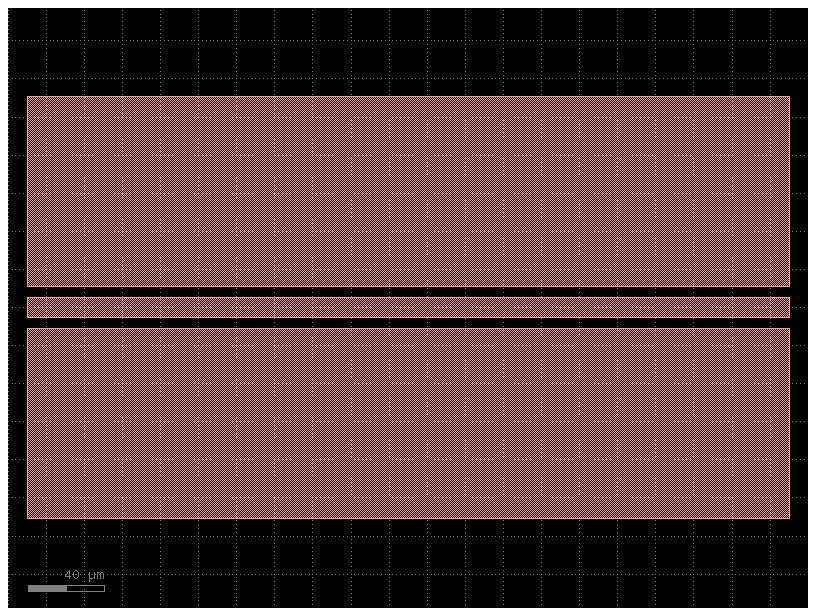
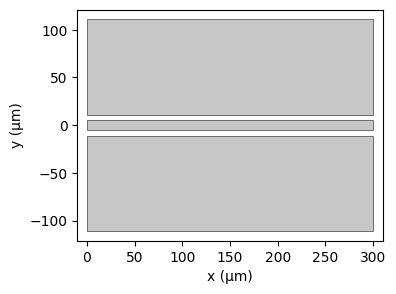
crop_to_feed_ports=True cuts the metal back to the two port planes so each outer face shows an
open CPW cross section, which is what the RF study's boundary-mode ports need.
layout = prepare_comsol_layout(
    component, METAL, feed_ports=("o1", "o2"), crop_to_feed_ports=True
)
print(f"{len(layout.polygons)} metal polygons, bbox {layout.bbox}")
for port in layout.feed_ports:
    print(port)

fig, ax = plt.subplots(figsize=(8, 3))
draw_layout_polygons(ax, layout.polygons)
ax.set_xlim(layout.bbox.xmin - 10, layout.bbox.xmax + 10)
ax.set_ylim(layout.bbox.ymin - 10, layout.bbox.ymax + 10)
ax.set_aspect("equal")
ax.set_xlabel("x (µm)")
ax.set_ylabel("y (µm)")
3 metal polygons, bbox ComsolBoundingBox(xmin=0.0, ymin=-111.0, xmax=300.0, ymax=111.0)
ComsolFeedPort(name='o1', center=(0.0, 0.0), width=10.0, orientation=180.0)
ComsolFeedPort(name='o2', center=(300.0, 0.0), width=10.0, orientation=0.0)


Text(0, 0.5, 'y (µm)')
Driven S-parameters
The sheet model treats the metal as PEC, so thickness, conductor loss, and kinetic inductance do
not enter. silicon_relative_permittivity defaults to 11.7; pass the value for your substrate,
e.g. its cryogenic permittivity.
if RUN_COMSOL:
    model = COMSOL.create_sheet(
        client,
        layout,
        name="gplugins CPW",
        substrate_thickness_um=200.0,
        air_height_um=200.0,
    )
    model.add_cpw_rf_study(cpw_gap_um=CPW_GAP, frequency_ghz=6.0, mesh_size=6)
    model.mesh()
    model.solve()
    freq_ghz = np.atleast_1d(model.evaluate("freq")).real / 1e9
    s21_db = np.atleast_1d(model.evaluate("emw.S21dB")).real
    print(f"|S21| at {freq_ghz[0]:.3f} GHz: {s21_db[0]:.3f} dB")
    client.remove(model)
else:
    print("RUN_COMSOL is False; skipping the licensed build and solve.")
RUN_COMSOL is False; skipping the licensed build and solve.
Capacitance between two pads
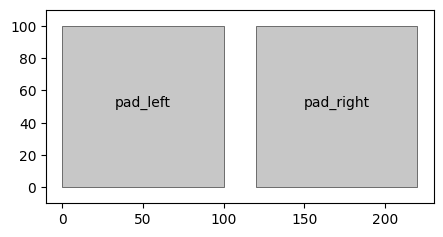
An unfed layout is extracted with feed_ports=None. The capacitance study needs one point per
metal face; the point names the face and must sit well inside it.
PAD = 100.0
SPACING = 20.0


@gf.cell
def two_pads() -> gf.Component:
    c = gf.Component()
    c.add_polygon([(0, 0), (PAD, 0), (PAD, PAD), (0, PAD)], layer=METAL)
    x = PAD + SPACING
    c.add_polygon([(x, 0), (x + PAD, 0), (x + PAD, PAD), (x, PAD)], layer=METAL)
    return c


pads_layout = prepare_comsol_layout(two_pads(), METAL)
conductors = (
    ("pad_left", (PAD / 2, PAD / 2)),
    ("pad_right", (PAD + SPACING + PAD / 2, PAD / 2)),
)

fig, ax = plt.subplots(figsize=(5, 3))
draw_layout_polygons(ax, pads_layout.polygons)
for tag, (x, y) in conductors:
    ax.annotate(tag, (x, y), ha="center")
ax.set_xlim(-10, 2 * PAD + SPACING + 10)
ax.set_ylim(-10, PAD + 10)
ax.set_aspect("equal")
if RUN_COMSOL:
    model = COMSOL.create_sheet(
        client, pads_layout, name="gplugins pads", lateral_margin_um=200.0
    ).add_capacitance_study(
        conductors=conductors, terminal="pad_left", grounds=("pad_right",)
    )
    model.mesh()
    model.solve()
    print(f"C11 = {float(model.evaluate('es.C11')) * 1e15:.2f} fF")
    client.remove(model)