Common Design Patterns
This guide presents recurring design patterns that kfactory users apply when building real PDKs. Each pattern is a self-contained recipe you can adapt.
Contents
- Component composition
- Port propagation through hierarchy
- Factory bundle (dataclass)
- Cross-section lookup in cached cells
- Tile / array pattern
- VKCell route → KCell materialise
import dataclasses

import kfactory as kf
from kfactory.factories.euler import bend_euler_factory
from kfactory.factories.straight import straight_dbu_factory


# Shared layers for all examples in this notebook
class LAYER(kf.LayerInfos):
    WG: kf.kdb.LayerInfo = kf.kdb.LayerInfo(1, 0)
    WGEX: kf.kdb.LayerInfo = kf.kdb.LayerInfo(2, 0)


pdk = kf.KCLayout("patterns_pdk", infos=LAYER)
L = pdk.infos
# li_* = integer layer indices (for direct shape insertion / port construction)
li_wg = pdk.find_layer(L.WG)
li_wgex = pdk.find_layer(L.WGEX)

enc = pdk.get_enclosure(
    kf.LayerEnclosure(
        name="WG_EX",
        main_layer=kf.kdb.LayerInfo(1, 0),
        sections=[(kf.kdb.LayerInfo(2, 0), 2000)],
    )
)

# Factory callables accept kdb.LayerInfo objects, not integer indices
straight = straight_dbu_factory(pdk)
bend_euler = bend_euler_factory(pdk)
1 · Component composition
Build complex cells from simpler primitives using the instance-and-connect
pattern. Each primitive is created once (cached by @kf.cell) and reused.
The recipe:
1. Create the parent cell.
2. Instantiate child cells with <<.
3. Connect the first instance to a fixed position; use connect() for the rest.
4. Expose the external ports on the parent.
@pdk.cell
def l_arm(
    width: float = 0.5,
    length1: float = 10.0,
    length2: float = 5.0,
    radius: float = 5.0,
) -> kf.KCell:
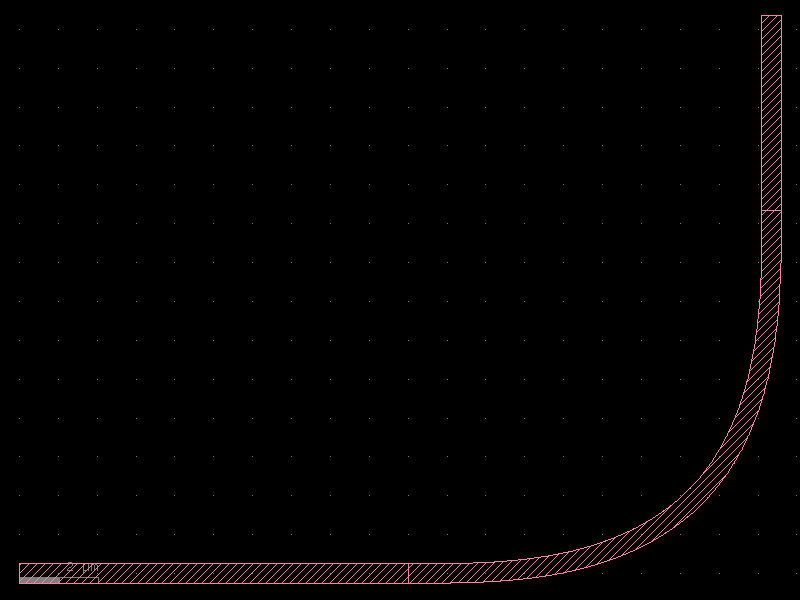
    """L-shaped arm: straight → 90° euler bend → straight."""
    c = kf.KCell(kcl=pdk)

    w_dbu = pdk.to_dbu(width)
    l1_dbu = pdk.to_dbu(length1)
    l2_dbu = pdk.to_dbu(length2)

    # Primitives (cached — same params reuse the same cell object)
    s1 = straight(width=w_dbu, length=l1_dbu, layer=L.WG)
    b = bend_euler(width=width, radius=radius, layer=L.WG)
    s2 = straight(width=w_dbu, length=l2_dbu, layer=L.WG)

    # Instantiate and chain
    i1 = c << s1
    i_b = c << b
    i2 = c << s2

    i_b.connect("o1", i1.ports["o2"])
    i2.connect("o1", i_b.ports["o2"])

    # Expose external ports
    c.add_port(port=i1.ports["o1"], name="o1")
    c.add_port(port=i2.ports["o2"], name="o2")
    return c


arm = l_arm()
print(f"ports: {[p.name for p in arm.ports]}")
arm.plot()
ports: ['o1', 'o2']
2 · Port propagation through hierarchy
When a cell wraps several children you need to surface the right ports to the caller. Two sub-patterns cover most cases:
a) Direct exposure — forward the child port unchanged:
c.add_port(port=inst.ports["o1"], name="in")
b) Bulk exposure with auto-renaming — expose all ports with a prefix:
c.add_ports(inst.ports, prefix="left_")
The example below builds a Mach-Zehnder skeleton and exposes four ports
(in, out, arm_top_in, arm_top_out).
@pdk.cell
def mz_skeleton(
    width: float = 0.5,
    arm_length: float = 20.0,
    radius: float = 5.0,
) -> kf.KCell:
    """Mach-Zehnder skeleton with exposed arm ports."""
    c = kf.KCell(kcl=pdk)

    w_dbu = pdk.to_dbu(width)
    al_dbu = pdk.to_dbu(arm_length)

    s_in = straight(width=w_dbu, length=pdk.to_dbu(5.0), layer=L.WG)
    s_arm = straight(width=w_dbu, length=al_dbu, layer=L.WG)

    # Bottom arm
    i_in = c << s_in
    i_arm = c << s_arm
    i_arm.connect("o1", i_in.ports["o2"])
    i_out = c << s_in
    i_out.connect("o1", i_arm.ports["o2"])

    # Top arm (offset upward by 2 × radius µm)
    i_arm_top = c << s_arm
    i_arm_top.dmove((0.0, radius * 2))  # pure µm offset

    # a) Direct port exposure with rename
    c.add_port(port=i_in.ports["o1"], name="in")
    c.add_port(port=i_out.ports["o2"], name="out")

    # b) Individual port exposure for arm access points
    c.add_port(port=i_arm_top.ports["o1"], name="arm_top_in")
    c.add_port(port=i_arm_top.ports["o2"], name="arm_top_out")

    return c


mz = mz_skeleton()
print(f"ports: {[p.name for p in mz.ports]}")
ports: ['in', 'out', 'arm_top_in', 'arm_top_out']
3 · Factory bundle (dataclass)
As a PDK grows it becomes hard to pass individual factory functions around.
The factory bundle pattern collects all factories into a frozen dataclass
that can be imported as a single object.
KCLayout does not provide built-in slots for factories, so use a dataclass at
module level instead.
from kfactory.factories.euler import BendEulerFactory
from kfactory.factories.straight import StraightFactory


@dataclasses.dataclass(frozen=True)
class PDKFactories:
    straight: StraightFactory
    bend_euler: BendEulerFactory


# Build once at module level, import everywhere.
factories = PDKFactories(
    straight=straight_dbu_factory(pdk),
    bend_euler=bend_euler_factory(pdk),
)


# Usage — cells receive the bundle, not the individual factories:
@pdk.cell
def my_component(width: float = 0.5, length: float = 10.0) -> kf.KCell:
    c = kf.KCell(kcl=pdk)
    w_dbu = pdk.to_dbu(width)
    s = factories.straight(width=w_dbu, length=pdk.to_dbu(length), layer=L.WG)
    inst = c << s
    c.add_port(port=inst.ports["o1"], name="o1")
    c.add_port(port=inst.ports["o2"], name="o2")
    return c


comp = my_component()
print(f"cell: {comp.name}")
print(f"factory bundle type: {type(factories)}")
[32m2026-05-12 10:04:24.616[0m | [31m[1mERROR [0m | [36mkfactory.kcell[0m:[36mname[0m:[36m698[0m - [31m[1mName conflict in kfactory.kcell::name at line 698
Renaming Unnamed_8 (cell_index=8) to straight_W500_L10000_LWG_ENone would cause it to be named the same as:
- straight_W500_L10000_LWG_ENone (cell_index=1), function_name=straight, basename=None[0m
cell: my_component_W0p5_L10
factory bundle type: <class '__main__.PDKFactories'>
4 · Cross-section lookup in cached cells
@pdk.cell (and @kf.cell) require hashable arguments. A
CrossSection object is not hashable, so you cannot pass one directly as a
parameter.
The standard pattern is:
1. Register cross-sections on the PDK once at module level.
2. Accept a name string as the cell parameter.
3. Look up the actual CrossSection inside the cell body.
from kfactory.cross_section import SymmetricalCrossSection

# Register once
xs_wg = SymmetricalCrossSection(
    width=pdk.to_dbu(0.5),
    enclosure=enc,
    name="WG",
)
pdk.get_icross_section(xs_wg)  # registers and returns it (idempotent)

xs_wide = SymmetricalCrossSection(
    width=pdk.to_dbu(1.0),
    enclosure=enc,
    name="WG_WIDE",
)
pdk.get_icross_section(xs_wide)


@pdk.cell
def wg_with_xs(xs_name: str = "WG", length: float = 10.0) -> kf.KCell:
    """Straight waveguide parameterised by cross-section name."""
    xs = pdk.get_icross_section(xs_name)  # ← lookup inside the cell body
    c = kf.KCell(kcl=pdk)
    l_dbu = pdk.to_dbu(length)
    c.shapes(li_wg).insert(kf.kdb.Box(l_dbu, xs.width))
    c.add_port(
        port=kf.Port(
            name="o1",
            trans=kf.kdb.Trans(2, False, -l_dbu // 2, 0),
            width=xs.width,
            layer=li_wg,
            port_type="optical",
            kcl=pdk,
        )
    )
    c.add_port(
        port=kf.Port(
            name="o2",
            trans=kf.kdb.Trans(0, False, l_dbu // 2, 0),
            width=xs.width,
            layer=li_wg,
            port_type="optical",
            kcl=pdk,
        )
    )
    return c


wg_std = wg_with_xs(xs_name="WG")
wg_wide = wg_with_xs(xs_name="WG_WIDE")
print(f"WG width (DBU):      {pdk.get_icross_section('WG').width}")
print(f"WG_WIDE width (DBU): {pdk.get_icross_section('WG_WIDE').width}")
WG width (DBU):      500
WG_WIDE width (DBU): 1000
5 · Tile / array pattern
Use kf.grid_dbu (for KCell) or kf.grid (for DKCell) to arrange a
collection of cells in a regular grid. This is useful for test structures,
component galleries, and fill tiles.
Key points:
| Function | Input cells | Coordinates |
|---|---|---|
kf.grid_dbu |
KCell (DBU) |
DBU integers |
kf.grid |
DKCell (µm) |
float µm |
The shape=(rows, cols) parameter sets the grid dimensions.
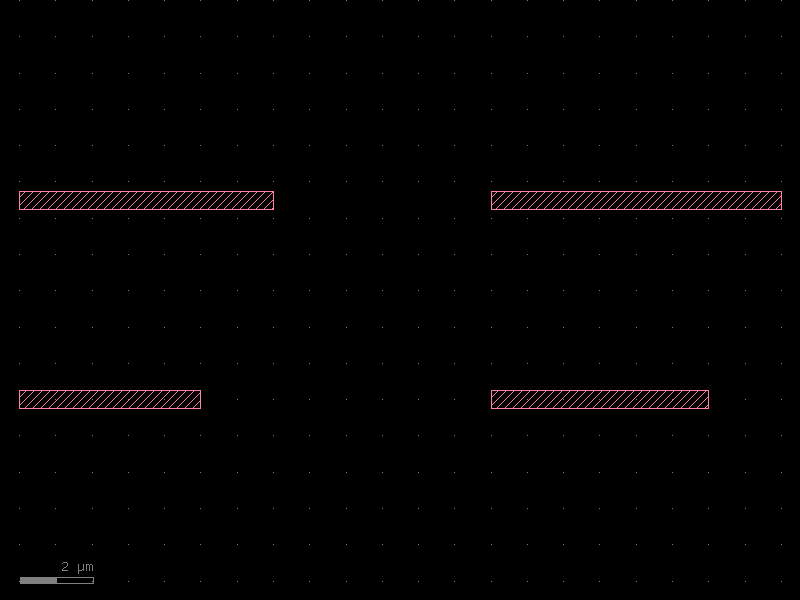
# Build a small set of components to tile
components = [wg_with_xs(xs_name="WG", length=float(5 + i)) for i in range(4)]

# grid_dbu places cells into a target KCell and returns an InstanceGroup
target = kf.KCell("wg_array", kcl=pdk)
kf.grid_dbu(
    target,
    kcells=components,
    spacing=pdk.to_dbu(5.0),
    shape=(2, 2),
    align_x="xmin",
    align_y="ymin",
)
print(f"grid cell name: {target.name}")
print(f"grid bbox (µm): {target.dbbox()}")
target.plot()
grid cell name: wg_array
grid bbox (µm): (0,2.75;21,8.75)
6 · VKCell route → KCell materialise
All-angle routing produces a virtual route (a VKCell). The pattern to
turn it into a permanent KCell is:
- Create the target cell.
- Build a
VKCellwith virtual straight / bend factories. - Call
kf.routing.aa.optical.route()to fill theVKCell. - Insert the virtual instance into the target cell with
VInstance.insert_into().
This keeps the route geometry isolated until you explicitly materialise it.
from functools import partial

import kfactory.routing.aa.optical as aa
from kfactory.factories.virtual.euler import virtual_bend_euler_factory
from kfactory.factories.virtual.straight import virtual_straight_factory

# Virtual factories are pre-configured with partial() — bind layer/width/radius
_v_straight_raw = virtual_straight_factory(kcl=pdk)
_v_bend_raw = virtual_bend_euler_factory(kcl=pdk)

v_straight = partial(_v_straight_raw, layer=L.WG)
v_bend = partial(_v_bend_raw, width=0.5, radius=10.0, layer=L.WG)

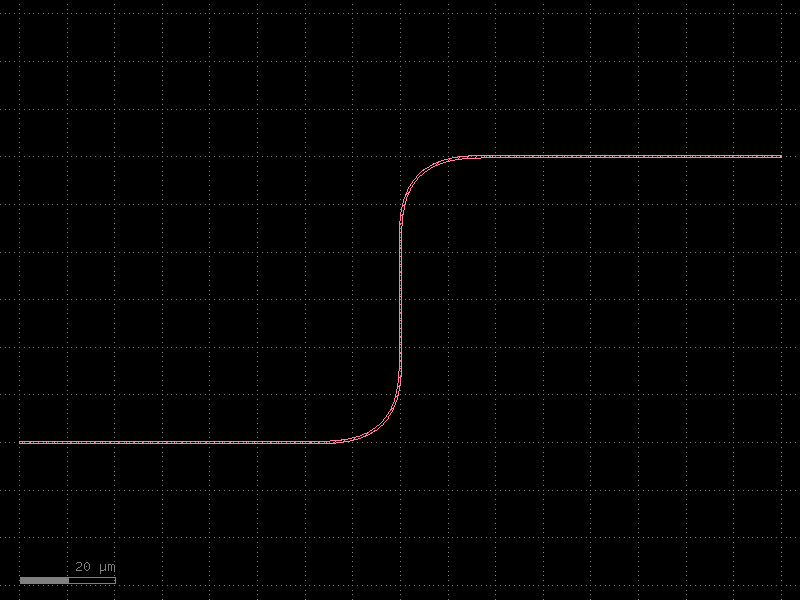
# Step 1 — route into a VKCell (virtual; geometry stays in-memory only)
# Create the VKCell via the PDK's KCLayout so layer indices match
vc = pdk.vkcell(name="aa_vkcell_demo")
aa.route(
    vc,
    width=0.5,
    backbone=[
        kf.kdb.DPoint(0, 0),
        kf.kdb.DPoint(80, 0),  # horizontal
        kf.kdb.DPoint(80, 60),  # 90° corner upward
        kf.kdb.DPoint(160, 60),  # horizontal to exit
    ],
    straight_factory=v_straight,
    bend_factory=v_bend,
)

# Step 2 — materialise into a real KCell
c_routed = kf.KCell("aa_vkcell_pattern", kcl=pdk)
vi = kf.VInstance(vc)
vi.insert_into(c_routed)

print(f"cell: {c_routed.name}")
print(f"bbox (µm): {c_routed.dbbox()}")
c_routed.plot()
cell: aa_vkcell_pattern
bbox (µm): (0,-0.25;160,60.25)
See Also
| Topic | Where |
|---|---|
| Common pitfalls to avoid | How-To: Best Practices |
| Frequently asked questions | How-To: FAQ |
| PCells & caching | Components: PCells |
| Routing overview | Routing: Overview |